For new user Ubuntu 10.10 and using multiboot system and using grub as bootloader, by default linux not give setting for change boot order. Example you want to use 'Windows XP/7' as default boot.
This trick may be can help you.
- install 'startupmanager' -> from menu select 'System' ->Administration->Synaptic Packager Manager-> find for 'startupmanager' then install that.
After install startupmanager, running that from System->Adminstration->StartUp-Manager->then change 'Default operating system' to O/S you like. Then close.
Showing posts with label Ubuntu. Show all posts
Showing posts with label Ubuntu. Show all posts

Ubuntu 10.10 Can not Select Framework on Netbeans 6.9.1
When we create new Project and want to select Framework like 'Java Server Faces' or other there is a check box that can not be check :(.
This Problem because Java Platform (java-6-open-jdk) is not Compatible with Ubuntu 10.10.
The solution is try using 'java-6-sun' on Synaptic known as 'sun-java6-jdk'
Edit netbeans.conf and change
This Problem because Java Platform (java-6-open-jdk) is not Compatible with Ubuntu 10.10.
The solution is try using 'java-6-sun' on Synaptic known as 'sun-java6-jdk'
Edit netbeans.conf and change
netbeans_jdkhome="/usr/lib/jvm/java-6-sun"
![Reblog this post [with Zemanta]](https://lh3.googleusercontent.com/blogger_img_proxy/AEn0k_um7P5u3PE9mU0OePXdyOVhg_Ufn5v0Mly2KAPylheHMPr1aRFobd_Q0tEd1nbWO42yime7NFSjw_vznF9B_jwdeSRRntGIL0RgAhAoGHnQXcHKlfsNUkMU4c2ePVpUlblsIEXWGwNJgAg80b8T_kui=s0-d)
Install Google Earth 5.0 on Ubuntu 9.04
Download GoogleEarth at this.
After download GoogleEarth change permissions to Executable.
From terminal go to Download Directory then run:
$./GoogleEarthLinux.bin
The following Screen will display.
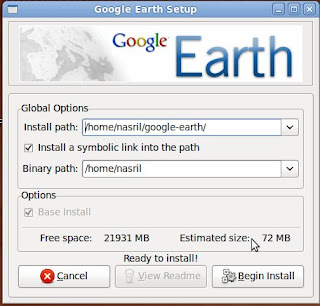
And follow install direction.
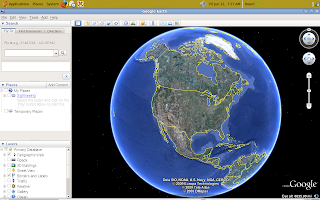
Run GoogleEarth by double click GoogleEarth icon on Desktop.
After download GoogleEarth change permissions to Executable.
From terminal go to Download Directory then run:
$./GoogleEarthLinux.bin
The following Screen will display.

And follow install direction.
Run GoogleEarth by double click GoogleEarth icon on Desktop.

Install NVidia driver on Ubuntu 9.04


My Notebook is Acer Aspire 4520 need install Nvidia driver (GeForce 7000M).
The following is install procedure :
From Menu : Applications >> Add/Remove ...
On search box type "nvidia" and then check for " NVidia binary X.Org driver ('version 173' driver)"
and push "Apply Changes" button, from pop-up window push "Apply" button. Type your Admin password if needed. Then Installation progress bar will running.
After finish intallation run from Terminal as Root :
#nvidia-xconfig
Restart the computer. Now The notebook will use valid Nvidia VGA driver...


Network setting in Ubuntu 9.04 is not easy
Install Ubuntu 9.04 on Acer Aspire 4520 notebook is so easy and the Gnome X window so beautiful.
But the problem is setting up network like wireless and Mobile using Samsung SGH-L700 as 3G modem never success.
Wireless using Atheros (ath5k) sometimes work, but on the other time that configuration will be disappear. I must resetting the wireless. Huh .. so tired.
Samsung SGH-L700 as modem is never connect, the phone will be restart Immediately and then no response from the phone. Using wvdial not help too.
Only one connection is success that is ethernet. But I don't like using this connection now.
I guess this distro is not fully compatible for Aspire 4520.

But the problem is setting up network like wireless and Mobile using Samsung SGH-L700 as 3G modem never success.
Wireless using Atheros (ath5k) sometimes work, but on the other time that configuration will be disappear. I must resetting the wireless. Huh .. so tired.
Samsung SGH-L700 as modem is never connect, the phone will be restart Immediately and then no response from the phone. Using wvdial not help too.
Only one connection is success that is ethernet. But I don't like using this connection now.
I guess this distro is not fully compatible for Aspire 4520.
Network Manager Problem on Ubuntu 8.10
After install Ubuntu 8.10 (intrepid). I have a problem to connect with our network. First time install there is no big problem on network connection. But if computer restarting, connection setting is lost.
That happen because network manager error to maintain connection setting.
To solve this problem we must change setting manually or using 'wicd' as network manager.
Limitations of wicd is :
1. Can not set multiple ethernet card.
2. Bonding setting. This so simple on Opensuse.
That happen because network manager error to maintain connection setting.
To solve this problem we must change setting manually or using 'wicd' as network manager.
Limitations of wicd is :
1. Can not set multiple ethernet card.
2. Bonding setting. This so simple on Opensuse.
Subscribe to:
Posts (Atom)